ArcadeCab
My New Mamewah layout
 As
I noted on the News page, it was time to change my
Mamewah layout before the
holidays. Although I liked the Dragon's Lair-inspired image in use for
the past year, it just seemed too cluttered as of late. I really did
add everything onto the layout: cabs, marquees, posters... everything.
With the holidays approaching, the promise of new gamers being introduced to
the cabinet gave me motivation to design my own "wrapper." This time I
wanted to incorporate my cabinet itself into the design.
As
I noted on the News page, it was time to change my
Mamewah layout before the
holidays. Although I liked the Dragon's Lair-inspired image in use for
the past year, it just seemed too cluttered as of late. I really did
add everything onto the layout: cabs, marquees, posters... everything.
With the holidays approaching, the promise of new gamers being introduced to
the cabinet gave me motivation to design my own "wrapper." This time I
wanted to incorporate my cabinet itself into the design.
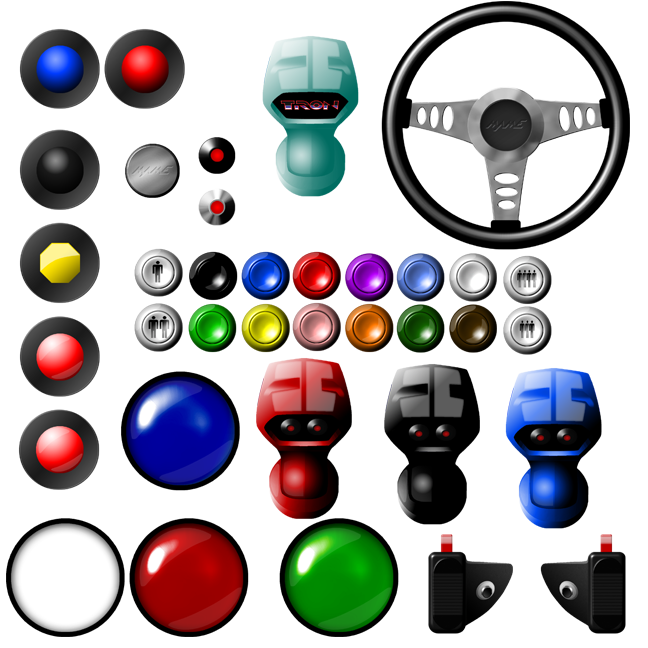
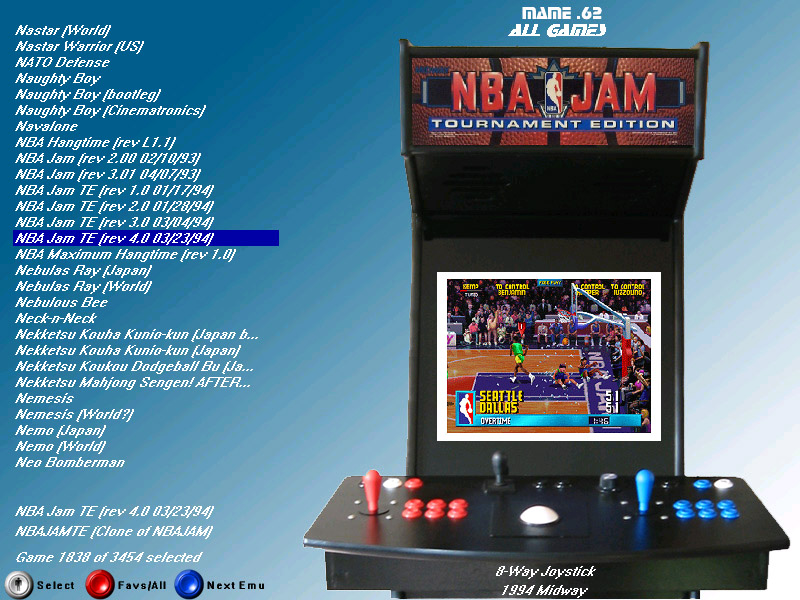
In Photoshop, I began with an 800x600 canvas and threw a blue gradient from the upper left to lower-right. From a number of photos of the cabinet taken a recent afternoon, I selected the best one for this purpose and 'cut' it from its background. It was then pasted atop the blue background. Because even the infrequent visitors occasionally forget how to start games or flip to the favorites list, a key was added that showed the three most useful buttons of the casual user. The buttons were taken from a package of button images that Frosticulus had provided the arcade community. I cannot find the original location of the file so I have included a copy below. Just be aware these images were not created by me- but they are excellent and you might find use for them.
After the image was finished, I used Mamewah's layout editor to toy with configurations. After a number of iterations, the layout seemed right to me. I typed MAME.62 into the title and created a similar one for my .96 install. The font used is the
STOP font. I hope this brief write-up might provide you with some small bit of inspiration to create your own Mamewah layout.
Files
|
(Note- Name this main.jpg for Mamewah version 1.62 and later) |
|
|
|
|
|
|